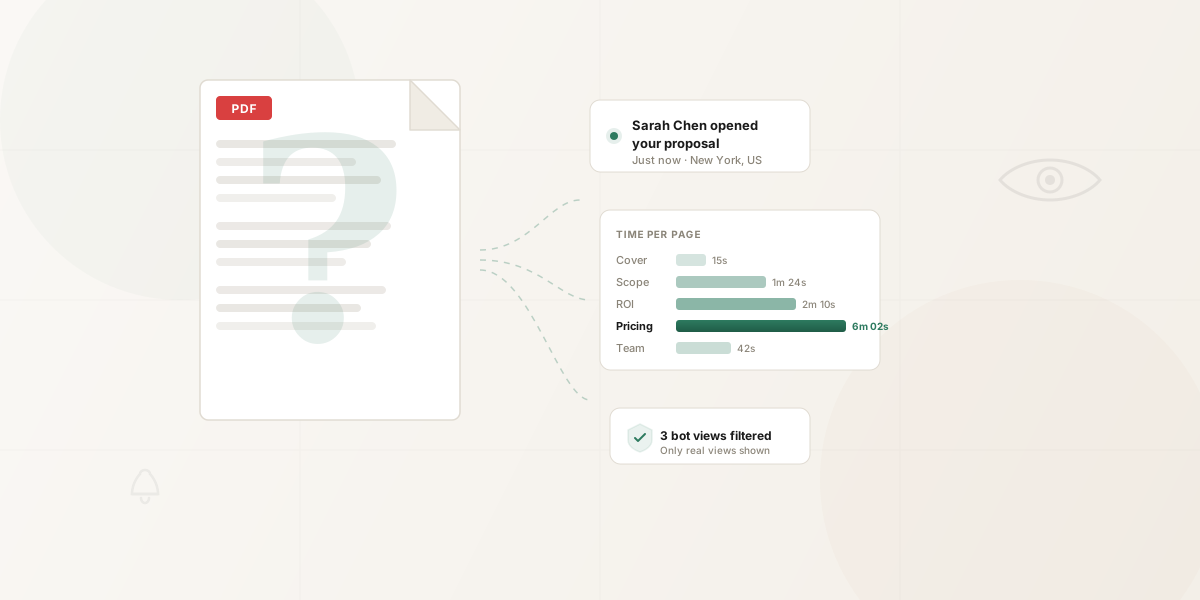
To track PDF opens, share the PDF through a browser link that records views. A tool with page analytics can also show activity and recorded time by page. An ordinary email attachment won't give you that reading record after it becomes a local copy.
Already sent the attachment? Use a tracked link for the next send. HummingDeck can't add tracking to a copy already downloaded to someone's device. The six methods below are ordered by how directly they answer what happened inside the PDF.
Short on time?
Share the PDF as a tracked link. Start free for basic views and qualifying email notifications. Starter adds page views and recorded time by page. See PDF sharing and tracking.
Track the next PDF you send
- Upload your PDF to HummingDeck using Preview in browser and check the processed document before sharing. A download-only PDF records a download action, not page-reading activity.
- Create a separate link for each intended recipient, or one link for the audience you want to measure together. Give each link a clear label. The label associates later activity with the intended audience; it does not verify who used the browser.
- Send the link by email or chat. Review recorded opens in the document's Links tab. On Starter or above, open Analytics to see pages displayed and recorded time by page.
For a single recipient, watch how to create a link for a PDF and track views. The short tutorial follows these steps with one link, from the upload to the time recorded on each page.
The walkthrough below uses one five-page proposal and separate links for three recipients. It shows the browser view, the initial view email, the Links tab and page activity. You can follow the steps without playing it.
How to Share a PDF with Multiple People and Track Views
Watch on YouTubePlays from YouTube when you press play.
Chapters
Read the transcript
00:00 One PDF, separate recipient links
You're sending the same PDF to three people. Here's how to give each person a separate link, then check the views and pages opened.
00:11 Upload your PDF
In HummingDeck, open your Library and choose Add document. Upload your PDF, wait for processing to finish, then open the document. We'll use this five-page proposal.
00:24 Create the first link
Click New link. Keep Personal Link selected, and leave access set to Anyone with the link. Add Sarah's name and email. These details label the link for Sarah; they don't send her an email. Leave Notify me when viewed on, then click Generate Link.
00:45 Send a different link to each person
Copy the link into your message to Sarah. Then create a new link for Daniel, and another for Priya. Send each person their own URL. All three links open the same PDF, with activity kept separate.
01:02 The recipient experience
Here's Sarah's view. She opens the link in her browser and moves through the PDF. With this access setting, she doesn't need a HummingDeck account.
01:12 Get notified when someone opens it
The moment she opens the link, you get an email. Because Notify me when viewed was on, it names the viewer and shows her device. On Pro and Business, Notify via Slack sends an alert to Slack too.
01:28 Compare recorded opens
Later, return to the document's Links tab. In this example, Sarah's link has two views, Daniel's has one, and Priya's has none recorded. You can also see when each link was last viewed.
01:44 Check page activity
To see which pages were opened, switch to Analytics. Under All Contacts, select Sarah. Page Engagement now shows the recorded activity for her link. Here, the pricing page has the most recorded time. Clear Sarah before selecting Daniel to compare their activity. Page-level analytics start on Starter.
02:09 Understand link identity
These results belong to the links you sent. An open link can be forwarded. For verified email access, use Restricted on Pro or Business.
02:20 Try it with your own document
Upload once, create a link for each recipient, and check the activity. Try it with your own document using the link below.
Use the early view email as a prompt to check the record. That email does not include later page-duration or completion metrics. An open link can be forwarded, and recorded page time does not prove that someone read or agreed with the page.
Method 1: Email read receipts and tracking pixels
An email read receipt concerns the message. Gmail makes receipts available to eligible work or school accounts, while Outlook says a recipient can decline a receipt. Neither receipt tells you which PDF pages were displayed after the attachment was saved.
An email tracking pixel records an image request from the message body. Apple Mail Privacy Protection can download remote content in the background, so an image request does not prove a person opened the message. It also says nothing about the attached PDF.
Use receipts or pixels if message-level activity is enough for your task. For document activity, send a browser link and review that link's record.
Method 2: Adobe shared PDF links
Adobe lets you share a PDF as a link. Its shared-document management guide describes view notifications, a viewed-person count and the last file-activity time. That can answer whether a shared Adobe file drew activity.
Adobe's shared-document guide covers file-level activity rather than recorded time by page. Sharing settings include anyone with the link and invited people only, so choose the access setting that fits your audience. Check Adobe's current plan terms if a specific setting matters.
This method applies to the Adobe-hosted shared PDF. It cannot add a view record to an attachment already downloaded by the recipient.
Method 3: Google Drive, Dropbox, or OneDrive shared links
These services offer different kinds of file activity. Google Drive's ordinary Activity panel reports changes such as edits, moves and sharing. View history in Docs, Sheets and Slides is a separate feature for eligible work or school files; it should not be presented as a PDF viewer log.
Dropbox viewer information can show a current viewer, and specified plans add last-viewed times and history. Someone who follows a shared link without being a team member or an invited person appears as a Guest, without a name or email in that viewer record. OneDrive for Business documents a file details pane for activity, comments and access, rather than time on individual PDF pages.
Use a storage link when the file needs to stay available for collaboration or download. Check each service's current viewer and notification behavior for your account instead of assuming that all three expose the same PDF activity.
Method 4: Google Analytics and Tag Manager (website PDF downloads)
On a tagged website, GA4 enhanced measurement fires a file_download event when a visitor clicks a link to a file with a matching extension. Tag Manager's link-click trigger can record a selected link action too. Use those events to compare interest in linked PDF assets on your site. They describe clicks; they do not confirm that the PDF opened, was downloaded successfully or was read.
The PDF does not need to live on the same domain for that click event to be useful. The relevant action happens on the tagged webpage. GA4 cannot report what happened inside a PDF attachment after it was sent by email.
Method 5: Link shorteners (Bitly, etc.)
Put a hosted PDF behind a short link if you need to measure link traffic from email, social or a campaign. Bitly describes its link metric as clicks; the amount of detail available depends on the plan.
A click tells you the short URL was followed. It does not establish that the destination PDF rendered or that someone looked at a page. Automated link checks can also produce link activity, so use the count as reach context rather than proof of reading. Shorteners do not replace a viewer that records PDF page activity.
Already using Gmail?
The HummingDeck Chrome extension is an optional way to insert a tracked link from Gmail. The basic upload, copy and paste workflow works without it.
Method 6: Dedicated document tracking tools
A document tracking tool serves the PDF in a browser viewer and records the activity that viewer supports. The useful comparison is what each tool actually records, how it associates a view with a link or verified email, how it handles scanners, and which plan unlocks page detail. Our document tracking software comparison covers those choices across eight products.
HummingDeck Free records basic views and can send email notifications for qualifying opens when Notify me when viewed is on. Starter adds page analytics, link expiry and ordinary download controls. Pro adds email capture and Restricted access for approved, verified inboxes. A named Personal link still labels the intended recipient; it does not verify who was at the device. An additional viewer record can indicate another browser, device or person, without proving that the link was forwarded.
If page activity is the reason you are sharing a PDF, choose Preview in browser at upload. A download-only PDF opens a delivery page and records an authorized download action, but it has no page-reading session. Downloads made from any shared link also leave copies outside later link revocation or download controls.
Suppose the proposal in the walkthrough shows the most recorded time on Pricing. A useful follow-up question is, “Would it help if I broke the implementation work into two phases?” The page record gives you a place to ask; it does not reveal the viewer's objection or purchase intent. A lack of recorded opens also leaves delivery, filtering and offline sharing unanswered.
For a multi-document review, a deal room can group PDFs and next steps under one link. For a single PDF, use the sharing setup that gives you enough activity detail and access control for the send.
Comparison table
| Method | Event you can observe | PDF page activity | Material limit |
|---|---|---|---|
| Email receipt or pixel | Message receipt or image request | No | Neither proves the attachment was opened |
| Adobe shared PDF | Shared-file views and activity | Not documented in the cited guide | Applies to the Adobe-hosted share |
| Cloud storage link | Service-specific file or viewer activity | No common PDF page log | Identity and history vary by service and plan |
| GA4 / Tag Manager | Click on a file link on a tagged webpage | No | A click is not a PDF open |
| Link shortener | Short-link clicks | No | A click is not a page view |
| Document tracking tool | Supported browser-viewer activity | Available on qualifying plans | Link attribution and recorded time do not prove identity or attention |
FAQ
Can you track a PDF sent as an email attachment?
Share a tracked link for the next send. HummingDeck records supported activity on that link; it can't add tracking to a PDF attachment already saved on the recipient's device. Embedded scripts depend on the recipient's PDF reader and security settings: Acrobat lets recipients disable PDF JavaScript, and its security settings can restrict external communication. That makes a script callback an unreliable receipt for ordinary recipients.
Can Adobe Acrobat track PDF opens?
Yes. Adobe documents notifications when a recipient views a shared file, along with a viewed-person count and last activity. Share the PDF through Adobe's link workflow and check its current plan terms for the settings you need. Its shared-document guide describes file-level activity rather than time on each page.
Does Google Drive show who viewed a PDF?
Google Drive's ordinary Activity panel reports file changes and sharing activity. Docs, Sheets and Slides have a separate view-history feature for eligible work or school files. For sender-facing activity on a shared PDF, use a documented shared-PDF viewer or tracking tool.
What's the difference between PDF downloads and PDF viewing?
A download click records an action to fetch a file. It does not tell you whether the recipient opened or read the local copy. A browser PDF viewer can record supported events such as opens and pages displayed while the recipient uses the shared link. GA4's file_download event is a file-link click, not a reading record.
How does bot detection work for PDF tracking?
HummingDeck filters known bot user agents and checks additional network and interaction signals to reduce scanner noise in recorded views. A qualifying view can trigger an email notification, but no filter proves that every remaining event came from a human. Our guide to scanner noise explains what to check before acting on a suspicious open.
Is it appropriate to track PDF views?
A tracked link records activity associated with that link, such as an open, pages displayed and device information. A Personal link can carry an entered recipient name or email; Ask Email stores an address supplied by the viewer, while Restricted access verifies access to an approved inbox. Choose the link setting that fits the document and tell recipients how you share and use their information.
How should I follow up after a recorded PDF view?
Use the activity to ask a useful question about the document. Recorded time on Pricing can prompt a question about scope or phasing, but it does not prove price concern, reading comprehension or intent to buy. If no open is recorded, check whether the link reached the recipient before assuming they ignored it. Our proposal follow-up guide goes deeper on interpreting these signals.
Can you track a PDF shared on social media?
A tracked PDF link can record views and, on Starter or above, page activity from people who open it through a browser. A public link does not identify a specific social account. Email capture or Restricted access can add an email signal when that fits the sharing workflow, but neither proves who was physically at the device.
Related: Can you track email attachment opens? | PDF hosting options | Document tracking software compared | How scanner traffic affects document analytics