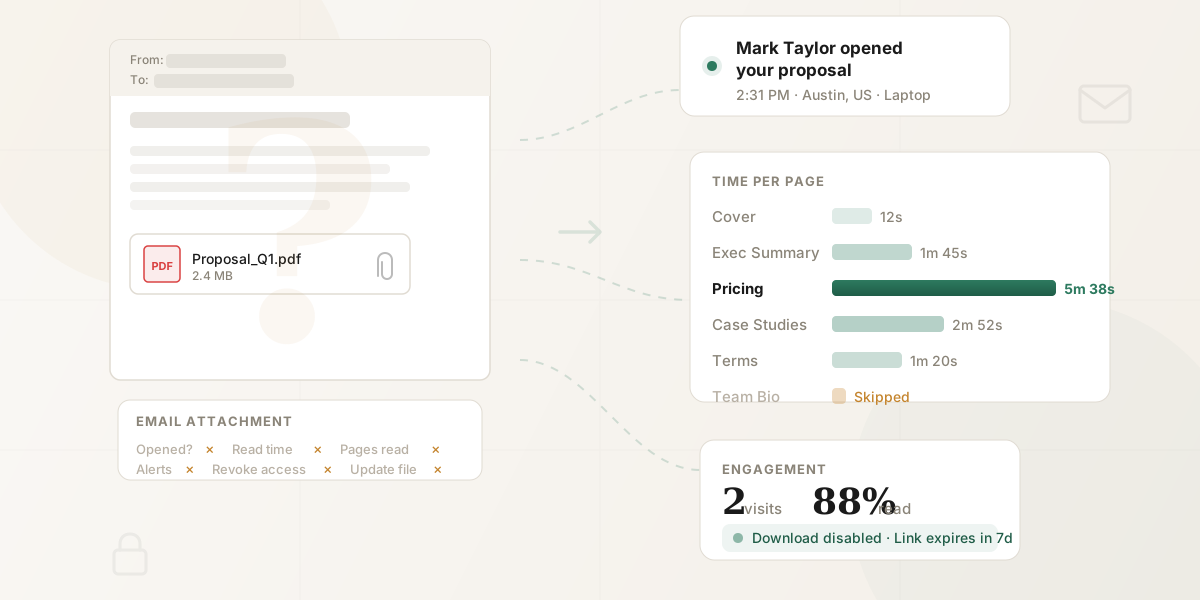
Track the next document you email by sharing a browser link instead of attaching the file. Gmail and Outlook read receipts concern the email, not which PDF pages someone viewed. A tracked document link can record opens and page activity while you keep using the same email client.
Already sent the attachment? Use a tracked link for the next send. HummingDeck can't add tracking to a copy already saved on someone's device.
How the workflow changes
1. Upload the document. Choose Preview in browser for your PDF or other supported file in HummingDeck. Open the preview and check it before sharing.
2. Create a recipient link. Give each intended recipient or audience a clear link label. That label associates later activity with the link; it does not verify the person behind the browser.
3. Paste the link into your email. Write your Gmail or Outlook message as usual and use the link in place of the attachment. For example:
Hi Alex, here's the proposal we discussed: [View the proposal]. It covers the scope, timeline and pricing. Let me know if you'd like me to clarify anything before Thursday.
4. Review recorded activity. Qualifying opens can trigger an email notification. On Starter and above, inspect page activity in HummingDeck. A recipient link associates activity with its intended audience but doesn't prove who opened it.
For one recipient, watch how to create a link for a PDF and track views. The short tutorial follows these four steps, from the upload to the time recorded on each page.
The PDF sharing walkthrough shows a five-page proposal in the recipient's browser, the initial view notification, and the later activity record. The email alert is about the open; it does not include the later page-duration or completion metrics.
For files in Google Docs or Slides, use the Google Workspace add-on. See the Google Doc and Google Slides guides for those workflows. The Chrome extension is optional; you can paste the link into Gmail without it.
Why email attachments can't be tracked
An ordinary email attachment gives the recipient a separate copy of the file. Your email client can report events about the message, but it has no continuing view of a PDF opened from the recipient's device. A separate enterprise document system can have its own access records; those records depend on that system, not on an ordinary Gmail or Outlook attachment.
If the file is a PDF, the PDF-open guide compares six methods for checking activity after you share it.
Attachment vs. tracked link: what you see
| Event or control | Ordinary email attachment | HummingDeck link to a previewable document |
|---|---|---|
| Email opened | A read receipt or image fetch can report message activity | Your email client still handles message activity |
| Document opened | No continuing record from the local copy | Qualifying opens appear on the share link and can trigger an email alert |
| Page coverage and time | No page record from the local copy | Recorded page coverage and time on Starter or above |
| Additional viewers | No share-link viewer record | Additional viewer records, which do not prove forwarding or identity |
| Location | No PDF location signal | Approximate, IP-derived location associated with recorded activity |
| Downloads | Recipient already has a copy | Downloads can be controlled on Starter or above |
| Access after sending | The sent copy remains with the recipient | Revoke the link to block new access through it; downloaded copies remain |
| Document updates | Send another attachment | Replace a standard document while retaining its links; revoke an active Proposal or Decision Capture link before replacement |
HummingDeck Free includes basic views and qualifying email notifications. Starter adds page analytics, link expiry and ordinary download controls. Pro adds email capture and restricted access. These plan boundaries matter when you compare a free view alert with a page-activity example.
Compare viewers in our document tracking software guide and hosting in the PDF hosting options guide.
Three workarounds people try (and why they fall short)
1. Email read receipts
Google's Gmail help says read receipts are available to eligible work or school accounts, not personal Gmail accounts, and recipients can be asked to approve them. Microsoft's Outlook guidance says recipients can decline a read receipt. Both products describe a receipt for the email message. Neither receipt reports which pages of an attachment were opened.
2. Email tracking pixels
A tracking pixel records an image request from the email body. That request is separate from opening an attached document and is not proof that a person read the message. Apple explains that Mail Privacy Protection can download remote email content in the background before the recipient views it. If you need to compare document activity rather than email-open tools, see our proposal tracking tools guide.
Read the signal you actually have
An email receipt concerns the message. An image request concerns remote email content. A recorded page view concerns activity in a supported document viewer. None of these events, on its own, proves who read the proposal or what they thought of it.
3. Password-protecting the attachment
A password can restrict access to the file, but sending or asking for that password gives you no page-reading record from the local copy. If the recipient needs a protected document and you also need activity, choose a share-link workflow with the access controls that fit your plan.
What a recorded view can help you ask
The published PDF walkthrough uses a sample five-page proposal. Sarah's intended link has two recorded views, Daniel's has one, and Priya's has none. In the page activity for Sarah's link, Pricing has the most recorded time. These are example records for the links, not proof that those people personally opened the browser or that price is a concern.
A useful follow-up is: "Would it help if I broke the implementation work into two phases?" The activity gives you a reason to ask a specific question without claiming to know the buyer's motive. For proposal-specific workflows, see sharing proposals as tracked links.
When email attachments still make sense
An attachment is practical when the recipient needs an editable local file, must keep an offline copy, or is exchanging a small reference file with a colleague. If you send a tracked link and permit downloads, later reading of the downloaded copy remains outside the link's page analytics.
For an ongoing set of client deliverables, a branded client portal can keep the files together. Our DocSend alternative comparison covers managed sharing options when a single attachment no longer fits the job.
Frequently asked questions
Can you track a PDF attachment in Gmail?
Share a tracked PDF link for the next send. Gmail read receipts describe the message, not pages viewed in an attachment. HummingDeck records supported activity when the recipient uses the link.
Does Outlook tell you if someone opened your attachment?
Use a tracked document link when you need document activity. Outlook read receipts concern the email message and recipients can decline them; they do not report PDF page activity.
Can you embed tracking in a PDF?
Share the PDF through a browser viewer that records supported activity. Embedded PDF behavior depends on the reader and its security settings, so it is not a reliable way to track an ordinary emailed attachment.
Is it unprofessional to send a link instead of an attachment?
Use a clear link label and tell the recipient what it opens. They can view a previewable document in a browser, and you can allow downloads when a local copy is needed.
What if the recipient prefers to have the file locally?
Allow a download on the share link if the recipient needs a local copy. HummingDeck records the browser activity before that download, if any; later reading of the local file is outside link analytics. Download controls require Starter or above.
Do tracked links work on mobile?
Open the link in a mobile browser to view a previewable document. HummingDeck records supported link activity there; page analytics starts on Starter.
Can you track email attachment opens for free?
Use a tracked link for basic views on HummingDeck Free. Qualifying opens can trigger email notifications. Page-by-page analytics starts on Starter. The recipient views the shared document in a browser.
What if I already sent the attachment?
Share a tracked link for the next send. HummingDeck records supported activity on that link; it can't add tracking to a PDF attachment already saved on the recipient's device.
Summary
Keep using Gmail or Outlook. For the next document you want to follow up on, host the document and share a managed link. Check the preview, send the recipient link, and use the recorded activity to guide a question rather than assume the reader's identity or intent.