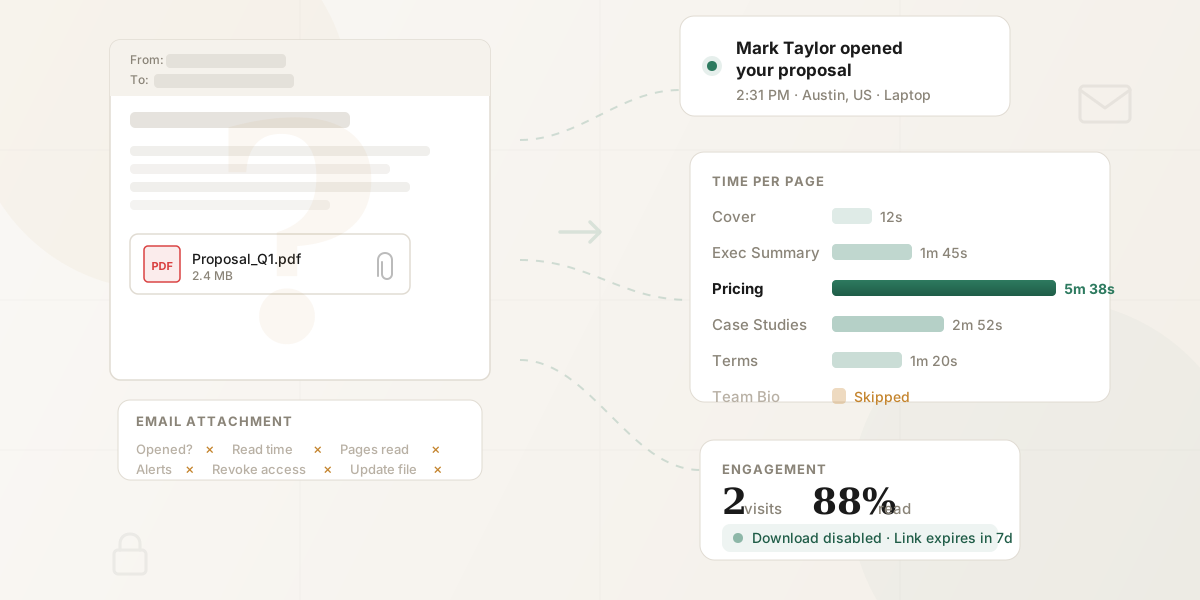
Short answer: neither Gmail nor Outlook can tell you if someone opened an email attachment. Once you attach a file and hit send, you lose all visibility into what happens to it. There's no built-in mechanism in email that tells you whether your prospect opened your attachment, how long they spent with it, or whether they even downloaded it.
But you can replace the attachment with a tracked link. Same file, full analytics. Takes 30 seconds.
This post covers why attachments can't be tracked, the workarounds people try, and how tracked links solve the problem.
Why email attachments can't be tracked
When you attach a file to an email, the file gets encoded and embedded directly into the email message. The recipient's email client downloads the entire message — attachment included — to their device. From that point forward, the file is a local copy sitting on their computer or phone. It has no connection back to you.
There's no server in the middle watching what happens. No phone-home mechanism. No way for the file to report back that it's been opened, read, or printed. Once the file is in their hands, you have no idea what happens to it.
This is true regardless of file type. PDFs, Word documents, PowerPoint files, spreadsheets — none of them have built-in tracking when sent as email attachments. For a deeper look at PDF-specific tracking methods, see our guide to tracking PDF opens.
Attachment vs. tracked link: what you see
Before diving into the workarounds people try, here's the core difference:
| Email attachment | Tracked document link | |
|---|---|---|
| Know if they opened it | No | Yes — real-time notification |
| Know when they opened it | No | Yes — timestamp with timezone |
| Know how long they spent | No | Yes — per-page analytics |
| Know which pages they read | No | Yes — page-by-page engagement |
| Know where they lost interest | No | Yes — drop-off analysis |
| Know if they clicked links inside | No | Yes — click tracking |
| Know if they came back later | No | Yes — return visit tracking |
| Know if they shared it with others | No | Yes — new viewer detection |
| Know their device and location | No | Yes |
| Control whether they can download | No — they already have the file | Yes — toggle per link |
| Revoke access after sending | No — they already have the file | Yes — one-click revoke |
| Update the document after sending | No — they have a static copy | Yes — viewers see latest version |
| File size limits | 25MB (Gmail), 20MB (Outlook) | Typically 100MB+ |
Three workarounds people try (and why they fall short)
1. Email read receipts
Email read receipts (technically called MDN — Message Disposition Notifications) request that the recipient's email client send a confirmation when the email is opened. Some people assume this extends to attachments. It doesn't.
A read receipt, at best, tells you the email was opened. Not the attachment. And even that is unreliable:
- Most email clients let recipients decline the request silently — the sender never knows it was declined.
- Gmail's web interface doesn't support read receipts at all for personal accounts. Only Google Workspace accounts can request them, and only the Workspace admin can enable the feature.
- Many corporate email servers strip or auto-decline read receipt requests before they reach the recipient.
- Preview pane views may not trigger a receipt, even if the person read the entire email.
- If the email is forwarded, you get no receipt from the person who actually reads it.
Even in the best case — recipient clicks "yes" on the receipt prompt — all you learn is that they opened the email. Whether they opened the PDF you attached is a completely separate question with no answer.
2. Email pixel tracking (Mailtrack, Yesware, HubSpot)
Pixel tracking tools embed a tiny invisible image (a 1x1 pixel) in your email body. When the recipient's email client loads images, the pixel is fetched from a server, which logs the event as an "open."
This is more reliable than read receipts for tracking whether the email was opened, but it still tells you nothing about the attachment. The pixel lives in the email body, not inside the attached file. Opening the attachment doesn't trigger the pixel. Not opening the attachment doesn't prevent the pixel from firing.
And pixel tracking itself has become increasingly unreliable:
- Apple Mail Privacy Protection (enabled by default since iOS 15 and macOS Monterey) pre-fetches all email images through Apple's proxy servers. Every email appears "opened" regardless of whether the recipient actually read it. According to Litmus's Email Client Market Share data, Apple Mail accounts for roughly 58% of all email opens — meaning over half of your "opens" may be phantom reads.
- Gmail image caching — Gmail caches images on Google's own servers, which can cause tracking pixels to fire only once (on delivery) rather than on each actual open. Litmus's analysis found that image blocking affects 43% of emails in Gmail.
- Corporate email security tools (Barracuda, Mimecast, Proofpoint) often pre-scan and pre-load email images, generating false opens. These typically appear within seconds of delivery from different IP addresses, making it look like your email was opened multiple times from multiple locations.
- Image blocking — many email clients block external images by default. If images don't load, the pixel never fires, and a real open goes undetected.
Even if pixel tracking worked perfectly, it answers the wrong question. Knowing the email was opened tells you very little. You need to know what happened to the document inside it. For a survey of what real per-page tracking looks like across the platforms B2B teams use, see our breakdown of proposal tracking tools.
The attachment black hole
You sent a proposal on Monday. By Thursday, you're in limbo. Email pixel tracking says the email was "opened" — but Apple Mail Privacy Protection pre-loads every tracking pixel, so that "open" might be a phantom read. Meanwhile, the actual attachment — the 12-page proposal where your pricing lives — could be sitting unread in their Downloads folder. The MIT/Kellogg Lead Response Management Study found that waiting even 30 minutes to follow up drops your odds of qualifying a lead by 21x. Without knowing when someone actually reads your document, every follow-up is a guess.
3. Password-protecting the attachment
Some people password-protect their PDFs or Word documents, sharing the password in a separate message. The theory: if the recipient asks for the password or uses it successfully, they've at least accessed the file.
In practice, this adds friction without adding visibility. You know they entered the password (maybe), but you still don't know whether they read page 1 or page 12, spent 30 seconds or 30 minutes, or shared the file with anyone else. And the added friction — "please find the password in my separate email" — is more likely to delay engagement than encourage it.
Already using Gmail?
Install the HummingDeck Chrome extension and share tracked links instead of attachments, right from your compose window. No tab-switching, no workflow change. You get per-page analytics on every document you send.
The actual solution: stop attaching files
The reason email attachments can't be tracked is that they're copies. The fix isn't to find a clever way to track copies — it's to stop sending copies.
Instead of attaching a file, share proposals as tracked links. When your prospect clicks a link to view your document, the document loads from a server you control. That server can log everything: who opened it, when, from where, on what device, how long they spent on each page, what they clicked, and whether they came back for another look.
If you are choosing the platform behind that link, our document tracking software comparison compares eight tools by page analytics, recipient attribution, scanner handling, access controls, and price.
This is the same shift that happened with file storage (local files to cloud links), code (email patches to pull request URLs), and design (attached mockups to Figma links). The document stays in one place. You share access to it. And because every view goes through your server, you get complete visibility.
Email attachment tells you: "You sent a file. Good luck."
A tracked document link tells you: "Mark Taylor at Summit Partners opened your proposal today at 2:31 PM from his laptop in Austin. He spent 12 seconds on the cover, skipped the team bio, spent 5 minutes 38 seconds on pricing (pages 4-6), clicked the link to your case study on page 3, and came back the next morning to re-read the pricing section. Download is disabled. The link expires in 7 days."
How the workflow changes
Here's what changes in your day-to-day:
Before (email attachment):
- Write email
- Attach file
- Send
- Wait and wonder
After (tracked link via HummingDeck):
- Upload the document to HummingDeck. Add the PDF, deck, or file to your HummingDeck library once. If it lives in Google Docs or Slides, the Google Workspace add-on generates a tracked link without re-uploading.
- Write your email as usual. Compose the email to your recipient the way you normally would.
- Paste the tracked link instead of attaching the file. Drop in the HummingDeck link in place of the attachment. The recipient clicks and views the document in their browser, with no download, on any device.
- Send, and watch what happens. You get notified the moment they open it, and see who viewed it, when, for how long, which pages they read, and whether they came back or forwarded it.
If you're sharing documents that live in Google Docs or Google Slides, you can skip the upload entirely — HummingDeck's Google Workspace add-on generates a tracked link directly from inside Docs or Slides. No downloading, no re-uploading. For details on that workflow, see our guides on tracking Google Doc views and tracking Google Slides views.
The extra step is the initial upload — and if you're sharing the same proposal or deck with multiple prospects, you only upload once. Every subsequent share is just generating a new tracked link, which takes seconds.
The recipient's experience barely changes. Instead of downloading an attachment and opening it locally, they click a link and view the document in their browser. For most business documents — proposals, contracts, case studies, pricing sheets — this is actually a better experience: no download wait, no "which app opens this file type" confusion, works on any device.
Four scenarios where this changes the conversation
Sales proposals
You email a 12-page proposal as a PDF attachment. Three days later, you send a generic "just checking in" follow-up. With a tracked link instead, you'd see the prospect spent six minutes on pricing, skipped your company background, and came back the next morning to re-read the case study. Your follow-up becomes: "I noticed you had a chance to review the proposal — happy to walk through the pricing tiers in more detail. Would Thursday work?"
Contracts and agreements
You attach a contract for review. A week passes with no response. With an attachment, you have zero visibility. With a tracked link, you see the recipient has opened the contract three times, spending most of their time on sections 4 (liability) and 7 (termination). You know legal is reviewing it. You reach out to proactively address those clauses instead of waiting in the dark.
Offer letters
A recruiter attaches an offer letter and benefits overview to an email. With a tracked link, they see the candidate opened it within an hour, spent eight minutes on the compensation section, shared the link with someone else (likely a partner or advisor) who also read the compensation page, and came back two days later to re-read the equity vesting section. The recruiter knows the candidate is seriously considering the offer, that compensation is the key factor, and that another person is involved in the decision.
Investor decks
A founder attaches their pitch deck to a cold email to a VC. With a tracked link, they see the partner opened it the same afternoon, spent four minutes on the market size slide and three minutes on the financial projections, but skipped the team slide entirely. The follow-up focuses on market opportunity rather than team credentials — because that's what the investor actually cared about.
Strongest buying signal
Multiple unique viewers on the same link. When your prospect forwards the document to their CFO, legal team, or boss, you see new viewers appearing — even though the original email only went to one person. That means the deal is being discussed internally. Don't wait — offer to help.
When email attachments still make sense
Not every file needs tracking. Attachments are fine when:
- You don't care about engagement — internal files, reference materials, quick documents between colleagues
- The recipient needs to edit the file — a spreadsheet template they'll fill in, a document they'll mark up (though Google Docs or shared drives are usually better for this too)
- It's a tiny file in an informal context — a headshot for a conference bio, a one-page form
Tracked links are worth the workflow change when the document carries business weight: sales proposals, contracts, pricing sheets, case studies, offer letters, investor decks, client deliverables. Agencies managing ongoing client relationships can go further with a branded client portal that centralizes all deliverables and tracks engagement across projects. These are the documents where knowing how someone engaged — not just whether — changes what you do next. If you're moving away from email attachments and considering a dedicated platform, our DocSend alternative comparison covers what to look for.
Frequently asked questions
Can you track a PDF attachment in Gmail?
Tracked links are the only way: Gmail itself doesn't provide attachment tracking, and once a PDF is sent it becomes a local copy on the recipient's device with no connection back to you. Share PDFs as a tracked link instead of an attachment to capture every open, page, and second spent.
Does Outlook tell you if someone opened your attachment?
Outlook's read receipts cover only email opens (not attachments) and even those are unreliable: recipients can decline them, and many organizations auto-block them. There's no attachment-specific tracking in Outlook itself; use a tracked-link platform if you need per-document open data.
Can you embed tracking in a PDF?
Technically, PDFs support JavaScript that could phone home when opened, but virtually all PDF readers disable JavaScript by default for security reasons, and email clients strip it during scanning. Even if it worked, most security tools would flag it as malware. Some enterprise DRM solutions embed tracking, but these require the recipient to use specific software and are designed for intellectual property protection, not sales engagement.
Is it unprofessional to send a link instead of an attachment?
Link-sharing is standard business practice. Google Drive, Dropbox, OneDrive, and dedicated document platforms all generate shareable links, and most recipients don't notice (or care) whether they're clicking a link or opening an attachment. They just want to see the document.
What if the recipient prefers to have the file locally?
Most document tracking tools include an optional download button that you can enable per link. The recipient clicks the link, views the document, and downloads if they want a local copy. You still get the engagement data from their initial (and any subsequent) views.
Do tracked links work on mobile?
Yes. A good document tracking platform serves a mobile-responsive viewer. The recipient taps the link, the document loads in their mobile browser, and you see the same analytics (per-page engagement, device type, time spent) as you would from a desktop view. This is actually an advantage over attachments, which often require the recipient to have the right app installed to open the file on mobile.
Can you track email attachment opens for free?
Yes, with a tracked link rather than a native attachment. Gmail and Outlook do not offer attachment-level tracking. HummingDeck Free records basic views and sends real-time notifications; page-by-page engagement starts on the $10/month Starter plan. The recipient opens the same document in a browser without installing anything.
How do I know if someone opened an attachment I sent in Outlook?
Outlook can't tell you. Its read receipts report email opens (not attachment opens), recipients can decline them, and many mail servers strip them. To see attachment activity in Outlook, replace the attachment with a tracked link: you then get a real-time notification the moment it's opened, plus how long they spent and which pages they read.
Summary
Email attachments are untraceable by design. The file leaves your control the moment you hit send. Read receipts don't cover attachments. Pixel tracking only tracks the email, not the file inside it. Password protection adds friction without adding visibility.
The fix is straightforward: share a link instead of attaching a file. The recipient's experience barely changes — they click and view. Your experience changes completely — you see who opened your document, which pages they read, how long they spent, and when they're ready for follow-up.