
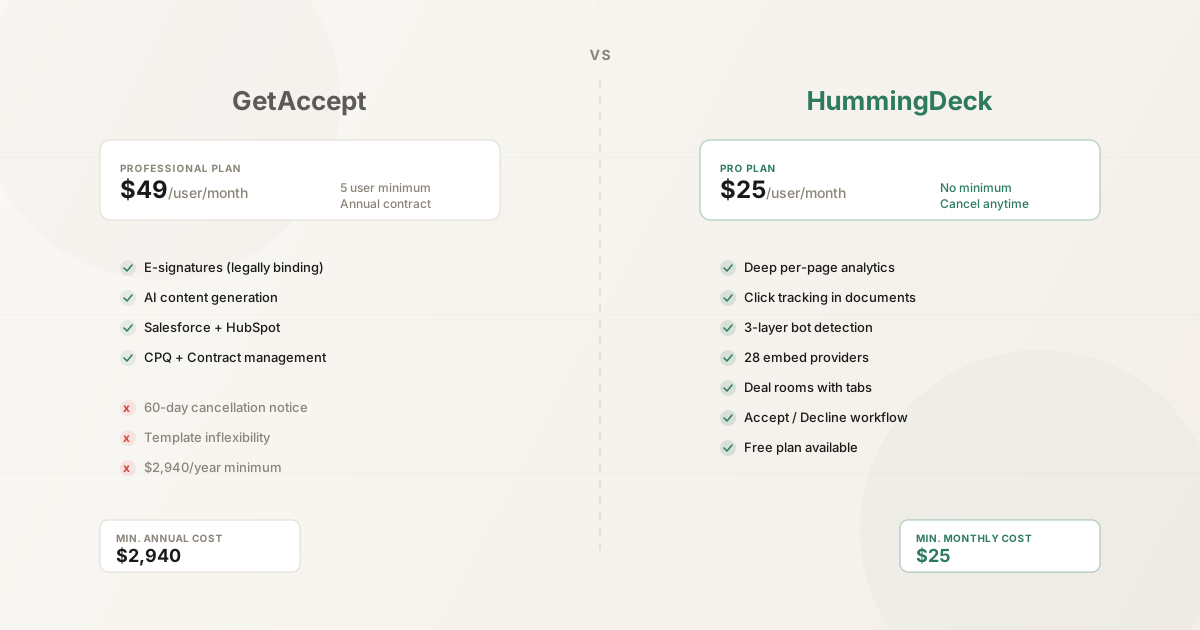
The wrong GetAccept alternative can save money and still make the sales process worse. GetAccept is not just a deal room. It combines document creation, pricing, engagement tracking, contracts, and legally binding e-signatures. Replacing it with a basic file-sharing link would remove the workflow that made it useful.
HummingDeck is a narrower alternative for a different operating model. It is built for small and mid-market teams that already create proposals, decks, and supporting content in their preferred tools, then need one shared workspace for the buyer, the next steps, the conversation, and the engagement data.
The short verdict: choose GetAccept when you want an all-in-one proposal-to-signature system. Choose HummingDeck when you want a focused, lower-commitment deal room around content you already have.
We checked GetAccept's public pricing and product documentation on September 19, 2026. Confirm current terms and add-ons with the vendor before buying.
30-second verdict
GetAccept Professional is the broader product. Its $49 per-user monthly list price, five-user minimum, and annual payment cover unlimited active rooms, native editing, mutual action plans, chat, contextual comments, pricing tables, document analytics, and legally binding e-signatures. CPQ and SSO are paid add-ons on Professional and included on Enterprise.
HummingDeck Pro costs $25 per user per month with no seat minimum. It includes 15 rooms, 15 documents per room, full mutual action plans, contextual Discussions, Restricted sharing, per-page document analytics, Close CRM, and Slack. Business costs $40 per user per month and removes room and document limits while adding custom domains and more branding control.
The products overlap at the deal-room layer, but their centers of gravity are different:
- GetAccept centers on creating and closing commercial documents. It can replace a proposal editor, pricing workflow, signature tool, and parts of the sales-content stack.
- HummingDeck centers on coordinating the deal around existing content. It adds buyer workspaces, MAPs, discussion, controlled access, and detailed engagement data without asking the team to rebuild its document workflow.
Disclosure
HummingDeck is our product, so this comparison cannot be independent. We use first-party GetAccept sources, name HummingDeck's limitations, and recommend testing the same live opportunity in both products.
Pricing and commitment
GetAccept publishes two relevant entry points. The $25 per-user eSign plan is for sending and signing documents, but it does not include the Deal Room capabilities compared here. Professional costs $49 per user per month, requires at least five users, and is paid annually. That creates a public minimum of approximately $245 per month or $2,940 across a 12-month term, before add-ons.
GetAccept also separates Deal Room, Contract Room, and Full Suite licenses. Confirm which module each user needs.
HummingDeck has no minimum seat count and bills monthly or annually. The relevant collaborative tier is Pro at $25 per user per month. Starter costs $10 per month flat, but it does not include Discussions or Restricted sharing, so it is not the fair tier for this comparison.
| Team size | GetAccept Professional | HummingDeck Pro | Difference per month |
|---|---|---|---|
| 1 user | Not available at the public minimum | $25 | HummingDeck is available for a solo seller |
| 3 users | $245 minimum | $75 | $170 |
| 5 users | $245 | $125 | $120 |
| 10 users | $490 | $250 | $240 |
GetAccept costs more because it includes workflows HummingDeck deliberately does not offer. If it replaces a proposal builder, e-signature service, and pricing tool, the total can be reasonable. If those systems already work, its broader scope is harder to justify.
Deal room workflow
Both products give sellers and buyers a shared place to run a deal. Both support content, next steps, mutual action plans, conversation, and engagement tracking. The difference is how much work happens before and after the room.
GetAccept: create, price, negotiate, and sign
GetAccept Professional includes an AI-assisted editor, reusable content, branding, pricing tables, meetings, and e-signature alongside the room. A seller can build the proposal, share it, discuss it, update it, and collect a legally binding signature without moving the buyer to another product.
Its Action Plan gives buyer and seller stakeholders a shared timeline with owners, deadlines, milestones, progress, and comments. GetAccept also offers room chat and contextual comments. That combination suits a sales organization trying to standardize the whole commercial-document process, not only the buyer destination.
HummingDeck: organize the content you already use
HummingDeck Rooms combine uploaded documents, tracked URLs, and embeds from approved video, scheduling, form, design, document, presentation, and audio providers. Sellers organize those assets into sections rather than rebuilding them in a native proposal editor.
Every Room, on every plan, includes one mutual action plan with flat tasks or phases. MAPs support buyer and seller owners, seller-only tasks, subtasks, dependencies, dates, templates, seller reminders, and calendar workflows. Buyers can complete the buyer-visible tasks assigned to their email without an account, but cannot create or edit the plan.
Pro and Business also include asynchronous Discussions at the room, content, section, and buyer-visible MAP-task level. A buyer can ask a question beside the item that prompted it, and the thread stays with the deal. Discussions are not live chat, private seller messaging, mentions, reactions, or real-time co-editing.
On Pro and Business, HummingDeck also supports Accept, Decline, and Request Changes with a timestamped decision record. This is useful for commercial approval, but it is not a legally binding signature. Keep an e-signature product in the workflow when the agreement requires one.
Analytics and secure sharing
GetAccept includes document tracking, a deal timeline, dashboards, reporting, reminders, and a deal score beside its proposal and contract workflow.
HummingDeck reports room, stakeholder, document, and page engagement. Sellers can inspect time by page, completion and drop-off, visits, device and geography context, and clicks on links or interactive elements. Per-page analytics starts on Starter, while Pro adds the collaborative and restricted-access workflow compared here.
Email security scanners complicate every engagement product. HummingDeck documents multi-signal scanner filtering on every plan: known bots are dropped, likely scanner sessions are flagged and kept out of view counts, and flagged sessions stay reviewable. We did not find equivalent bot-handling documentation in the public GetAccept sources reviewed for this update. That means not publicly documented, not that GetAccept has no filtering.
Secure access also differs:
- HummingDeck Restricted links can allowlist exact emails or company domains. Recipients verify through their inbox without creating an account. Sellers can separate audiences, set expiration, revoke links, and control downloads.
- GetAccept lets a Deal Room be restricted to invited participants, with an optional password, and documents SMS authorization and regional eID verification. SSO/SAML is an add-on on Professional and included on Enterprise. Domain allowlisting was not documented on the public pages we reviewed.
HummingDeck's inbox check proves access to an email account. It does not prove legal identity, prevent an authorized recipient from forwarding downloaded content, or create per-file permissions inside one room. Teams that need formal diligence controls, dynamic watermarking, structured Q&A, or audit exports should evaluate a dedicated virtual data room.
Feature comparison
| Capability | GetAccept Professional | HummingDeck Pro |
|---|---|---|
| Public list price | $49/user/month | $25/user/month |
| Minimum seats | 5 | None |
| Billing commitment | Annual payment, 12-month agreement | Monthly or annual |
| Active rooms | Unlimited | 15; unlimited on Business |
| Documents per room | Not presented as the core public limit | 15; unlimited on Business |
| Native proposal editor | Yes | No, bring existing content |
| Legally binding e-signature | Yes | No |
| Pricing tables | Yes | No |
| CPQ | Add-on on Professional, included on Enterprise | No |
| Mutual action plans | Yes | Yes, on every HummingDeck plan |
| Buyer conversation | Chat and contextual comments | Asynchronous contextual Discussions |
| Decision capture | Signing and document workflow | Accept, Decline, Request Changes; not e-signature |
| Engagement analytics | Document insights, timeline, dashboard, reporting, deal score | Stakeholder, document, page, completion, and click analytics |
| Scanner handling | Not publicly documented in reviewed sources | Documented multi-signal scanner filtering on every plan |
| Restricted access | Invite-only rooms, optional password, SMS and eID options | Exact email/domain allowlists with inbox verification |
| CRM integrations | Salesforce, HubSpot, Dynamics, Pipedrive, SuperOffice, and more; plan/add-on terms vary | Close CRM on Pro and Business; Zapier on every plan; HubSpot coming soon |
| Slack | Available | Available |
| Enterprise controls | SOC 2 report available on request; SSO/SAML add-on on Professional, included on Enterprise | No SOC 2 or SSO claim |
| Custom domain | Not publicly documented | Business, set up through a Support request |
Where GetAccept wins
GetAccept is the better choice when consolidation is the goal.
Native document creation. Reps can produce and personalize proposals inside the platform. AI-assisted editing, reusable content, pricing tables, and product-library features reduce handoffs.
Legally binding e-signature. Signing is part of the Professional workflow. HummingDeck's decision capture cannot replace it.
Contracts and CPQ. GetAccept extends from the room into contract and pricing operations. Its CPQ, included on Enterprise and sold as an add-on on Professional, builds pricing tables from a product library and CRM product data.
Broader CRM coverage. GetAccept supports major mid-market and enterprise CRMs. HummingDeck has Close CRM and Slack, with HubSpot coming soon and no Salesforce integration.
Enterprise security and identity options. GetAccept publishes SOC 2, SSO/SAML, SMS authorization, and regional eID options. HummingDeck should not be shortlisted where SSO or a formal compliance requirement is mandatory.
One commercial system. A buyer can move from proposal through discussion, pricing, contract, and signature without changing products. That is GetAccept's strongest advantage and the main reason to pay for its broader scope.
Where HummingDeck wins
HummingDeck is the better choice when the room should stay focused.
A lower entry point for small teams. One Pro user costs $25 per month and three cost $75, without a five-seat minimum.
Content-tool independence. Teams keep creating in PowerPoint, Google Slides, Canva, Figma, Loom, and their existing tools. The room becomes the shared buyer layer.
Detailed document engagement. Page time, completion, drop-off, and supported click tracking help distinguish a pricing-page revisit from a brief open. Known-scanner filtering is designed to reduce automated noise, but it cannot prove that every recorded event is human.
Verified allowlists without buyer accounts. Restricted links support named inboxes and company domains. Buyers verify the inbox without maintaining another account.
Full MAP structure without enterprise packaging. Phases, dependencies, subtasks, seller-only work, seller reminders, templates, buyer ownership, and calendar workflows are available on every plan, including Free. Contextual Discussions and Restricted sharing join them on Pro.
A deliberately narrower system. There is less to configure when proposal creation, signature, CPQ, and enterprise CRM orchestration already live elsewhere.
Which product fits your team
Choose GetAccept when most of these statements are true:
- You want to replace separate proposal, pricing, and e-signature products.
- Reps should create and edit commercial documents inside the same system they use to send them.
- Salesforce, HubSpot, Microsoft Dynamics, or another supported CRM must drive the workflow.
- Contracts, signing, CPQ, SSO, or formal compliance controls influence the purchase.
- At least five paid Professional users will use the broader product enough to justify the annual commitment.
Choose HummingDeck when most of these statements are true:
- Your team already creates strong proposals, decks, videos, and supporting documents elsewhere.
- You need a shared buyer workspace, not a new document-authoring system.
- One to ten sellers need MAPs, contextual conversation, verified access, and page-level engagement without a five-seat minimum.
- Close CRM and Slack cover the current native integration requirement.
- E-signature and CPQ are handled elsewhere or are not part of the room workflow.
- Monthly billing and a focused setup matter more than suite consolidation.
Build one active deal in both products with the same proposal, pricing, buyer task, and access setting. Ask an external stakeholder to reply and complete a task. The better product is the one both sides will keep using.
Try HummingDeck as a focused GetAccept alternative with one document or one live deal.
For a wider shortlist, our digital sales room comparison evaluates nine focused and all-in-one platforms for small and mid-market teams.
Frequently asked questions
Is HummingDeck a GetAccept alternative?
HummingDeck is a GetAccept alternative for small and mid-market teams that already create proposals and sales content elsewhere. It combines deal rooms, mutual action plans, contextual buyer discussions, restricted sharing, and document analytics. GetAccept is the stronger choice when native proposal creation, e-signature, CPQ, or broader CRM integration must live in the same platform.
How much does GetAccept cost?
GetAccept lists eSign at $25 per user per month and Professional at $49 per user per month. Professional includes deal rooms and has a five-user minimum, so its public starting commitment is about $245 per month or $2,940 for a 12-month term. Enterprise pricing is custom, and add-ons can change the total.
Which product is better for a small sales team?
HummingDeck is usually the more practical fit for a small sales team that wants focused rooms and analytics without a five-seat minimum. GetAccept earns its higher entry commitment when the team will actively use its document editor, pricing tables, legally binding e-signatures, CRM integrations, or contract workflow.
Does HummingDeck support e-signatures?
HummingDeck supports decision capture with Accept, Decline, and Request Changes, but that workflow is not a legally binding e-signature. Teams that need contracts signed inside the same product should choose GetAccept or connect HummingDeck with a separate signature tool.
How do HummingDeck and GetAccept compare on MAPs and buyer discussions?
Both products support mutual action plans and buyer conversation. HummingDeck MAPs include phases, owners, dependencies, subtasks, seller-only work, dates, templates, seller reminders, and buyer task completion on every plan. Its Discussions are asynchronous and contextual. GetAccept combines action plans with chat, contextual comments, meetings, and a broader proposal-to-signature workflow.
Which product offers stronger CRM and enterprise controls?
GetAccept offers the stronger CRM and enterprise stack, including integrations with Salesforce, HubSpot, Microsoft Dynamics, Pipedrive, and other systems, plus SSO and CPQ, which are add-ons on Professional and included on Enterprise. HummingDeck currently integrates with Close CRM and Slack and does not claim SSO or SOC 2 support.
Choose the scope you will actually use
GetAccept is the complete commercial-document platform. HummingDeck is the focused shared workspace around content you already have. Choose the operating model your team will use.
Related:
- Best digital sales room software: compare nine room platforms by usable price, MAPs, collaboration, access, and setup.
- Best Aligned alternatives: evaluate another focused shortlist for shared sales workspaces.
- What is a digital sales room?: understand the category before comparing vendors.
- Digital sales rooms for small teams: decide how much room software a lean sales process needs.
- Data room alternatives: compare lightweight sharing with formal virtual data room requirements.
- Why your deck analytics are wrong: see how email security scanners distort engagement signals.