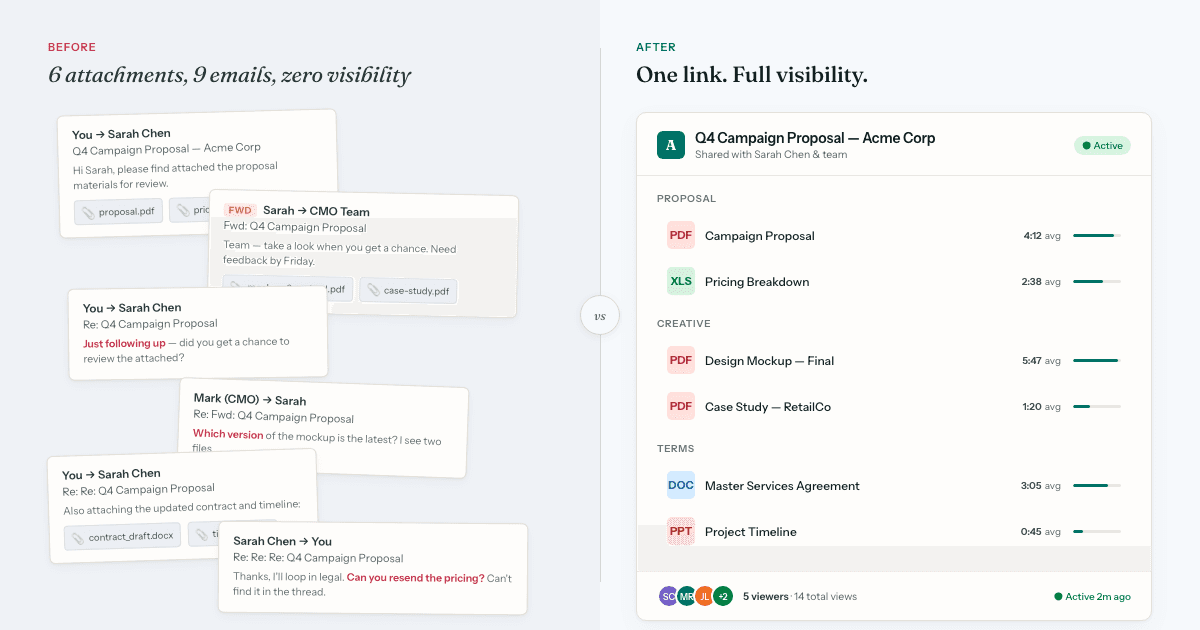
Gartner predicts that by 2026, 30% of B2B sales cycles will run through digital sales rooms instead of email attachments and ad-hoc file sharing. But here's what most articles miss: the fastest-growing use cases aren't in sales at all.
Sales teams discovered that buyers need a centralized hub to share with their internal committees. That same need exists in HR (candidate evaluation), agencies (client approvals), real estate (buyer due diligence), fundraising (investor data rooms), and consulting (project collaboration). The technology is the same. The stakeholders just changed.
If you're in HR, running an agency, selling properties, raising capital, or managing client projects, here's how teams like yours are using digital sales rooms — and why the name is misleading.
Short on time?
Jump to your use case: HR, Agencies, Real Estate, Fundraising, Consulting — or see which use case fits you.
What Actually Is a Digital Sales Room?
A digital sales room is a secure, branded web page where you organize multiple documents in one place, share it via a single link, and see exactly who viewed what and when.
Three core components:
- Multi-document organization — Proposal, pricing, case studies, contract in one place
- Single shareable link — No email attachments, no Dropbox chaos
- Analytics on every interaction — Who opened what, when, for how long, what they clicked
The "sales" label stuck because sales teams discovered this workflow first. But the underlying need — I need to share important documents with someone who will share them internally, and I need to know what's getting attention — applies to any high-stakes decision involving multiple stakeholders.
1. HR & Recruiting: Offer Packages That Actually Get Accepted
The Problem
You send a candidate an offer letter via email. They go silent for a week. You don't know if they're excited, hesitant, or if the email went to spam. Meanwhile, you're holding the req open while other candidates move forward with competitors.
How Deal Rooms Solve It
HR teams use deal rooms to create candidate offer packages — everything a candidate needs to evaluate and accept, in one link:
- Offer Letter
- Compensation & Benefits Breakdown
- Team & Culture Overview
- Your First 90 Days
- Equity Explanation (if applicable)
- Relocation Package Details (if applicable)
What You Learn From the Analytics
Real engagement signals. Did the candidate spend 8 minutes reading compensation details or 30 seconds? That tells you where their concerns are before the negotiation call.
Who else is involved. When the link gets forwarded to a new viewer, you know they're seriously considering the offer and involving their inner circle — a spouse, partner, or mentor.
Conversion blockers. If no one opens the benefits doc, maybe your offer letter isn't compelling them to look deeper. If they return to the equity section 3 times, you know that's their sticking point.
Why It Works
The same logic that helps sales reps prioritize warm leads applies to recruiting. A candidate who views your offer package 4 times across 3 days is more engaged than one who opened it once. Instead of following up blindly, recruiters can time their calls to when candidates are actively reviewing materials.
Compliance bonus: The audit trail — who viewed what, when, and from where — provides documentation for EEOC compliance and proves that candidates had access to all required policy documents.
HR Use Case Summary: Offer letters, benefits packages, policy acknowledgments, onboarding materials. Track which sections candidates care about most, identify when they're sharing with partners or advisors, and time follow-ups based on real engagement.
2. Agencies: Client Approvals Without the Email Tennis
The Problem
You send a client 6 files: creative brief, 3 design mockups, timeline, and contract. They forward it to their CMO. The CMO asks a question about "slide 4 of mockup 2." You have no idea which file they mean or if they even saw the contract. Five emails later, you're still clarifying basics.
How Deal Rooms Solve It
Agencies use sales rooms to create client approval packages — organized, branded, and trackable:
- Creative Brief & Strategy
- Design Concept A — Modern Minimalist
- Design Concept B — Bold & Colorful
- Design Concept C — Editorial Luxury
- Project Timeline & Milestones
- Budget Breakdown
- Master Services Agreement
What You Learn From the Analytics
Which creative direction is winning. If the client and their team spend 4 minutes on Concept B and 30 seconds on the others, you know their preference before the feedback call.
Budget vs. creative attention. If they spend 6 minutes on creative and skip the budget doc entirely, they're bought in on the concept but might balk at price later. Preempt this in your call.
Stakeholder mapping. When you see 4 different viewers from the client's company, you know this is going up the chain. Prepare for a larger committee approval process.
Why It Works
Agency-client relationships live and die by communication clarity. A room with organized sections replaces the "did you see my email?" cycle and gives account managers a real-time view of where the client's head is — before the call, not during it.
Agency Use Case Summary: Campaign proposals, design approvals, project scopes, contracts. Identify client's preferred creative direction before the feedback call, map which stakeholders are involved, and eliminate "did you see my email?" confusion.
If you're an agency looking for a permanent client-facing space beyond a single proposal, see how HummingDeck works as a client portal for agencies.
3. Real Estate: Know Which Buyers Are Serious Before the Showing
The Problem
You email a prospective buyer a listing package: property photos, floor plans, comparable sales, HOA docs, inspection summary. They say "looks great, we'll think about it." You schedule a showing. They don't show up — or worse, they arrive having read nothing and waste an hour asking questions the documents already answer.
Meanwhile, you have no idea whether the couple who went quiet last week actually forwarded the package to their mortgage broker (a strong buy signal) or just deleted it.
How Deal Rooms Solve It
Agents use digital sales rooms for property packages — everything a buyer needs to evaluate, organized in one branded link:
- Photo Gallery & Virtual Tour Link
- Floor Plans & Property Details
- Comparable Sales Analysis
- Neighborhood Guide & Schools
- HOA Documents & Fees (if applicable)
- Pre-Inspection Summary
- Mortgage Pre-Qualification Checklist
What You Learn From the Analytics
Serious vs. casual interest. A buyer who spends 10 minutes on floor plans, returns twice, and forwards the link to a new viewer (likely their mortgage broker or co-buyer) is genuinely evaluating. A buyer who glances for 30 seconds isn't worth a follow-up call.
What matters to them. If they spend most of their time on HOA docs and comparable sales, they're doing due diligence — not tire-kicking. If they only viewed photos and skipped financials, they're still in the browsing phase.
Timing your follow-up. When you see a burst of activity after a week of silence — 3 views in one evening — that's the moment to call. They're actively discussing it.
Why It Works
Real estate agents juggle dozens of prospects. Document tracking lets agents prioritize the buyers most likely to make an offer and time their outreach to when interest is highest — not on an arbitrary follow-up cadence.
Luxury market bonus: For high-end listings where confidentiality matters, rooms offer password protection and link expiration to control who sees sensitive financial details — something email attachments can never guarantee.
Real Estate Use Case Summary: Listing packages, property disclosures, comparable analyses, HOA docs. Separate serious buyers from browsers, time follow-ups to peak interest, and present a polished, professional experience that differentiates you from agents still emailing PDFs.
4. Fundraising: Investor Data Rooms That Don't Cost $500/Month
The Problem
You're raising a seed round. You email your pitch deck to 40 investors. Three weeks later, you have no idea who's actually looked at it, who forwarded it to their partners, or who deleted it immediately. You follow up blindly, burning credibility with investors who weren't interested and missing the ones who were.
How Deal Rooms Solve It
Founders use investor data rooms for pitch packages — organized, trackable, and professional:
- Pitch Deck (15 slides)
- Financial Model & Projections
- Market Research & TAM Analysis
- Product Demo Video (embedded or linked)
- Customer Case Studies & Testimonials
- Cap Table & Current Round Terms
- Data Room (contracts, compliance, IP)
What You Learn From the Analytics
Genuine interest vs. politeness. If an investor views your deck for 30 seconds, they're not interested. If they return 3 times and forward it to 2 colleagues, you have a live opportunity. Prioritize follow-up accordingly.
What slides matter. Investors spending 3 minutes on your traction slide but skipping market size? They believe in execution but not the opportunity. Adjust your follow-up narrative.
Partnership-level interest. When you see 4 viewers from the same VC firm, you're past the associate screening. Prepare for partner meetings.
Origin Story Worth Knowing
This is literally how DocSend got started. Founder Russ Heddleston needed to track which investors actually read his pitch deck. He built a tool for himself, then realized every founder had the same problem. DocSend's annual Pitch Deck Report — analyzing data from thousands of fundraises — became the authoritative source on fundraising benchmarks. Dropbox acquired DocSend for $165M in 2021.
The Cost Reality
Traditional "investor data rooms" (Intralinks, Datasite) cost $500–3,000/month and are built for M&A due diligence, not startup fundraising. Modern deal room tools range from free to $50/month and cover what most founders actually need.
Fundraising Use Case Summary: Pitch decks, financial models, data rooms, term sheets. Identify which investors are seriously evaluating vs. being polite, understand what traction signals matter most to your audience, and follow up strategically based on actual engagement.
5. Consulting & Professional Services: Project Proposals That Close Faster
The Problem
You send a consulting proposal with a detailed SOW, pricing, case studies, and your standard contract. The client says "let me review and get back to you." Two weeks later, you follow up. "Still reviewing internally." You have no visibility into whether the CEO, CFO, and operations lead have all actually seen it or if it's sitting in one person's inbox.
How Deal Rooms Solve It
Consultants use deal rooms for project proposals and RFPs:
- Executive Summary (2 pages)
- Current State Assessment
- Proposed Solution & Methodology
- Project Timeline & Deliverables
- Team Bios & Relevant Case Studies
- Pricing & ROI Breakdown
- Statement of Work / Contract
What You Learn From the Analytics
Buying committee composition. When you see viewers from Finance, IT, and Operations, you know this is a multi-stakeholder decision. Tailor your follow-up to address each department's concerns.
Price sensitivity. If prospects view pricing for 5 minutes and then forward the proposal, they're likely getting budget approval. If they view once and never return, price might be the blocker.
Decision timing. When activity spikes suddenly after two weeks of silence — 3 new viewers in one day — you know they're entering final evaluation. This is when your follow-up call is most effective.
Why It Works
Consulting sales cycles are long because multiple stakeholders review independently. Document tracking collapses the "are they still interested?" guesswork into observable behavior — who's reading, what they care about, and when they're active.
Mutual action plan integration: Some deal room tools let you embed a shared checklist in the room ("Review solution approach ✓", "Get finance approval", "Legal review of terms") visible to both parties. This transforms passive proposals into active project management.
Consulting Use Case Summary: RFP responses, project proposals, SOWs, contracts. Map the decision-making committee, identify price objections before they're voiced, and know exactly when to follow up based on real engagement signals.
Why "Sales Rooms" Became the Default Name
Sales teams were the first to widely adopt this workflow because they had the most acute pain: complex deals with long cycles, multiple stakeholders, and millions in revenue on the line. The ROI was immediate and obvious, so "digital sales room" stuck as the category name.
But the underlying need — I need to share important documents with people who will share them with others, and I need to know what's getting attention — exists in any high-stakes decision with multiple stakeholders.
If you're in HR making a $150K+ hire, you have the same need as a sales rep closing a $150K deal. The mechanics are identical; only the content changes.
The vendors know this. Trumpet, Aligned, Dock, and GetAccept all market to multiple functions now. The category is expanding beyond sales — it just hasn't fully rebranded yet.
What to Look for in a Deal Room Tool
Regardless of your use case, evaluate tools on these criteria:
Must-Haves
- Multi-document organization — One link for 5–10 files
- Per-document analytics — Not just "they opened the room" but "they spent 4 minutes on this file"
- Viewer notifications — Real-time alerts when someone engages
- Stakeholder tracking — See when the link is forwarded to new people
- Mobile-friendly viewing — 40%+ of document viewing happens on mobile
- No login required for viewers — Friction kills. Recipients should access with one click.
Nice-to-Haves
- Per-page analytics — Which specific slide or section got attention (offered by DocSend, HummingDeck, Papermark, and others)
- Embedded e-signatures — Close the loop without another tool (GetAccept, PandaDoc, Dock)
- CRM integration — Sync activity back to Salesforce, HubSpot, Close, etc.
- Mutual action plans — Shared checklists visible to both parties
- Custom branding — Your logo, colors, and domain
Red Flags
- No free tier or trial — You should be able to test before committing
- Per-recipient pricing — Costs should scale with your team size, not your audience count
- Requires viewers to create accounts — If your recipients need to sign up, adoption drops dramatically
For a detailed platform-by-platform comparison, see our Digital Sales Room Software Compared: 2026 Buyer's Guide.
Getting Started: Which Use Case Fits You?
Making hires and managing candidates?
Create offer packages with letter, benefits, team info, equity breakdown. Track which sections candidates care about most. Get an audit trail for compliance.
Tools to try: Dock (simplest UX), HummingDeck (affordable analytics), Notion (if already using it)
Pitching clients or responding to RFPs?
Organize proposals, creative work, pricing, contracts in one room. Identify which creative direction clients prefer before the call. Map stakeholder involvement.
Tools to try: Qwilr (design-heavy proposals), HummingDeck (per-page analytics), PandaDoc (proposal-focused)
Selling or showing properties?
Share listing packages, disclosures, comparables in one branded link. Separate serious buyers from browsers based on real engagement. Time follow-ups to when prospects are actively reviewing.
Tools to try: HummingDeck (affordable, rooms feature), DocSend (established), Dock (clean viewer UX)
Raising capital from investors?
Share pitch deck, financials, data room materials with one link. Track which VCs are seriously evaluating vs. being polite.
Tools to try: DocSend (strong VC brand recognition), HummingDeck (affordable alternative), Papermark (open-source, self-hosted)
Managing consulting projects or professional services?
Send RFP responses, SOWs, case studies, contracts in one room. Map the buying committee. Know when to follow up based on real engagement.
Tools to try: HummingDeck (rooms + action plans), Better Proposals, GetAccept (e-sign built in)
Selling B2B products with complex sales cycles?
The original use case — organize proposals, demos, pricing, case studies, contracts. Track buying committee, identify champions, predict deal health.
Tools to try: Trumpet (polished UI), Aligned (AI insights), Dock (simplicity), GetAccept (all-in-one)
The Bottom Line
Gartner's research on digital sales rooms points to a market expanding well beyond its original sales-only audience. HR teams need the same visibility into candidate decision-making that sales teams need for prospects. Agencies need the same stakeholder mapping for client approvals. Real estate agents need the same engagement signals to prioritize buyers. Founders need the same intelligence for investor conversations.
If you're currently sending important multi-document packages via email, Dropbox links, or Google Drive folders — and you have no idea who's actually reading them or what's getting attention — you're experiencing the exact problem digital sales rooms solve.
The tools were built for sales teams, but the workflow works for anyone making high-stakes asks involving multiple documents and multiple stakeholders. The only question is whether your current process — email attachments and hope — is costing you opportunities.
Try it with your next high-stakes send. Create a room, organize your documents, send one link, and watch the analytics. HummingDeck offers a free plan — you can test the workflow in under 5 minutes.
FAQ
Are digital sales rooms only for sales teams?
Digital sales rooms apply far beyond sales. The underlying workflow (sharing multiple documents via one link and tracking engagement) works for HR (offer packages), agencies (client proposals), real estate (listing packages), fundraising (pitch decks), and consulting (RFP responses). The "sales" label stuck because sales teams adopted the tools first.
How much does deal room software cost?
Free tiers are common for basic use (3–10 documents). Paid plans range from $10–65/user/month depending on features. Enterprise pricing is typically custom. See our detailed comparison for platform-by-platform pricing.
What's the difference between a data room and a digital sales room?
Traditional data rooms (Intralinks, Datasite) are built for M&A due diligence with granular permissions, compliance features, and $500+/month pricing. Digital sales rooms are lighter-weight — focused on document sharing, engagement analytics, and buyer experience at $10–50/month.
Do recipients need to create an account to view a deal room?
With most modern tools, no. Recipients click a link and view immediately — no signup required. Some platforms gate advanced features (commenting, task completion) behind email verification.
Can I track who forwards my documents?
Yes. Most deal room tools detect when a new viewer (different device, location, or IP) accesses the link. Some tools identify individual viewers by name if email capture is enabled.